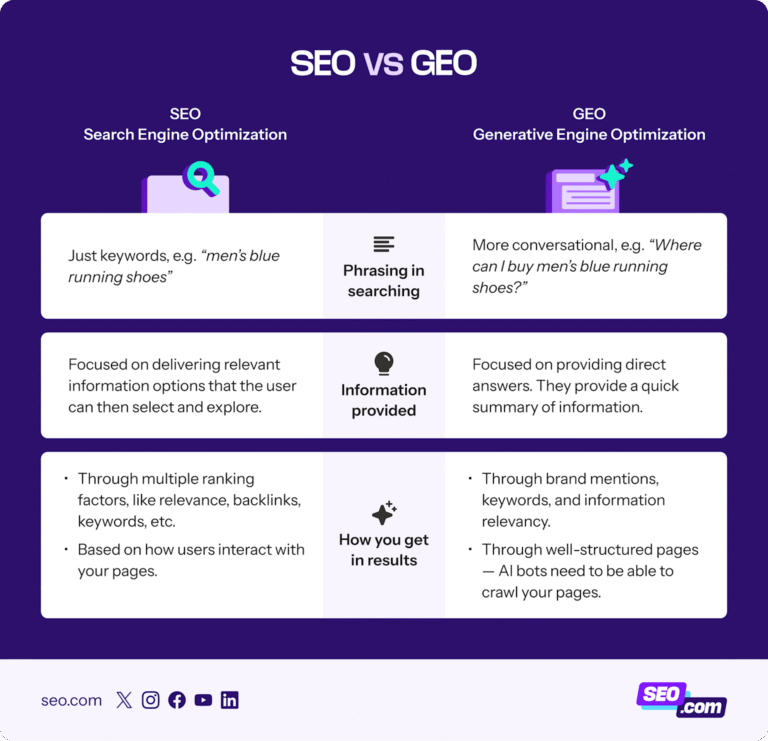
100 ChatGPT Prompts for SEO: Your Complete Beginner’s Guide to Simplifying Search Engine Optimization
Tired of feeling overwhelmed every time someone mentions “SEO strategy” or “keyword optimization”? You’re not alone. Search Engine Optimization can seem like a complicated puzzle with too many pieces.
But here’s the good news: artificial intelligence tools like ChatGPT are changing the game, making SEO accessible to everyone, even complete beginners.
Think of ChatGPT as your personal SEO assistant that works 24/7, never gets tired, and can help you with everything from finding the right keywords to writing compelling meta descriptions. The best part? You don’t need to be a tech wizard to use it.
In this guide, we’ll explore 100 proven ChatGPT prompts organized into 10 essential SEO categories. These are the exact prompts professionals use to plan, write, and optimize content faster than ever before.
Whether you’re running a small business, managing a blog, or just starting your digital marketing journey, these tools will save you hours of work and help you rank higher on Google.

What Exactly Is SEO? (The Simple Version)
Before diving into the prompts, let’s understand what SEO actually means in plain English.
Search Engine Optimization (SEO) is the process of making your website easier for search engines like Google to find, understand, and recommend to people searching for information.

Imagine Google as a helpful librarian who needs to organize millions of books (websites). SEO is like adding clear labels, descriptions, and categories to your book so the librarian can quickly find it when someone asks for it.
When someone types a question into Google like “best pizza near me” or “how to train a puppy”, the search engine looks through billions of web pages to find the most helpful answers. SEO helps your website become one of those top answers.
Why Should You Care About SEO?
Here are three compelling reasons:
Free Traffic: Unlike paid advertisements, SEO brings visitors to your website without paying for each click.
Long-Term Results: Good SEO keeps working for months or even years after you publish content.
Trust and Credibility: Websites that rank high on Google are often seen as more trustworthy and authoritative.
How ChatGPT Makes SEO 10 Times Easier
ChatGPT is an artificial intelligence tool that understands and generates human-like text. Think of it as having a knowledgeable friend who can instantly help you with writing, research, and strategy, all through simple conversations.
What Makes ChatGPT Perfect for SEO Work?
Speed: Tasks that used to take hours can now be completed in minutes.
Versatility: From keyword research to content creation, ChatGPT handles multiple SEO tasks.
Accessibility: You don’t need special training, just ask questions in normal language.
Cost-Effective: The basic version is free, making professional SEO tools accessible to everyone.
Approximately 86% of SEO professionals are already using AI tools like ChatGPT in their daily work. The difference between those who succeed and those who struggle often comes down to knowing the right prompts to use.
The 10 Essential SEO Categories (And Why Each Matters)
Professional SEO work divides into ten key areas. Understanding each category helps you build a complete strategy that covers all bases. Let’s explore each one:
Category 1: Keyword Research & Strategy
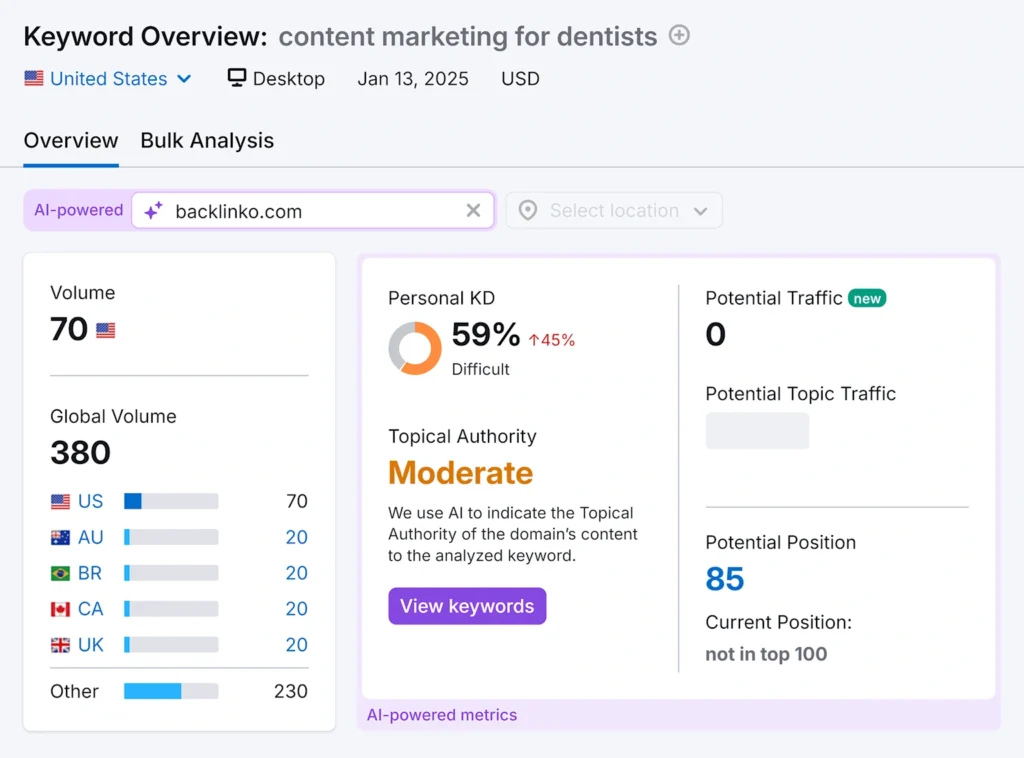
Keyword research dashboard for ‘content marketing for dentists’ showing volume, difficulty, and topical authority metrics
What it means: Finding the exact words and phrases people type into search engines when looking for what you offer.
Why it matters: Keywords are the foundation of SEO. Without the right keywords, your content won’t reach your target audience.
Real-life example: A local bakery might discover that people search for “gluten-free birthday cakes near me” 500 times per month in their city. By targeting this specific phrase, they can attract exactly the customers they want.
10 Powerful Prompts for Keyword Research:
- Generate a list of 20 long-tail keyword ideas related to “[Primary Keyword]” that have commercial intent.
- Analyze the search intent behind the keyword “[Keyword].” Is it informational, commercial, navigational, or transactional?
- Create a semantic keyword cluster for a pillar page about “[Core Topic].” Include 5 primary keywords and 15 secondary supporting keywords.
- Suggest 10 “question-based” keywords (starting with who, what, when, where, why, how) for a business that sells [Product/Service].
- I have a competitor’s website: “[CompetitorURL.com].” Generate a list of keywords you think they are ranking for, based on their content.
- Find keyword gaps by comparing my topic “[My Topic]” with the competing article from “[CompetitorURL.com].” What keywords are they targeting that I am missing?
- List 10 seasonal keywords related to “[Industry/Niche]” for the upcoming [Holiday/Season].
- Suggest 5 “beginner-friendly” keyword ideas for a new blog in the “[Niche]” industry, with low competition.
- Translate and localize these 5 core keywords: “[Keyword1], [Keyword2], [Keyword3]” for the [e.g., Spanish-speaking] market. Ensure they are culturally relevant.
- Based on the product “[Product Name & Description],” generate a list of keywords for each stage of the marketing funnel: awareness, consideration, and conversion.
Category 2: On-Page SEO & Content Optimization
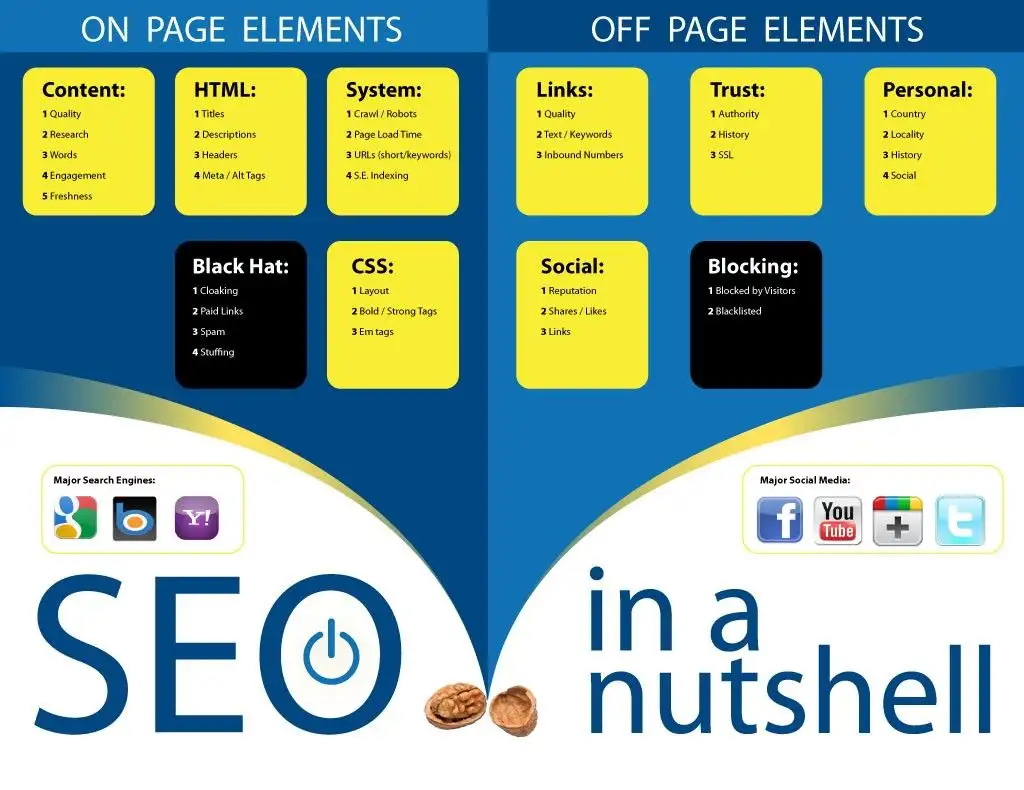
What it means: Optimizing individual web pages to rank higher by improving titles, headings, content quality, and keyword placement.
Why it matters: On-page SEO tells Google exactly what your page is about and helps it match your content with searcher needs.
Real-life example: A fitness blog changes its article title from “Exercise Tips” to “10 Beginner-Friendly Home Workouts for Busy Professionals” and sees a 200% increase in clicks because the new title is more specific and appealing.
10 Essential On-Page SEO Prompts:
- Write a compelling SEO title tag (under 60 characters) and meta description (under 160 characters) for a page about “[Page Topic]” targeting the keyword “[Primary Keyword]”.
- Suggest optimal H2 and H3 subheadings for a 1500-word blog post about “[Blog Post Topic].” Include the primary keyword “[Keyword]” and related terms naturally.
- Review the following text and suggest improvements for keyword density, readability, and semantic SEO: [Paste your text here].
- Generate 5 alt text descriptions for an image about “[Image Subject]” on a page targeting the keyword “[Primary Keyword]”.
- Create a URL slug that is SEO-friendly for a page titled “[Long Page Title]”.
- Optimize the following introductory paragraph for both readability and the primary keyword “[Keyword]”: [Paste your current intro].
- Suggest schema markup (JSON-LD) ideas suitable for a “[Type of Page – e.g., Recipe, Product, Local Business]” page.
- Write a call-to-action (CTA) for the end of a blog post about “[Blog Topic]” that encourages engagement and reduces bounce rate.
- Analyze this page’s content structure. How can I better use bullet points, numbered lists, and short paragraphs to improve readability? [Paste content].
- Generate 3 different internal linking anchor text suggestions for a link pointing to my page about “[Target Page Topic]”.
Category 3: Content Ideas & Topic Generation

What it means: Brainstorming and developing fresh, engaging content topics that attract your target audience.
Why it matters: Consistent, valuable content keeps your audience engaged and gives search engines more pages to rank.
Real-life example: A gardening website creates a “10 Best Low-Maintenance Plants for Apartments” article after discovering this topic gets 5,000 monthly searches, resulting in significant new traffic.
10 Creative Content Generation Prompts:
- Generate 10 blog post ideas that would attract users in the “awareness” stage of the buyer’s journey for “[Topic/Industry]”.
- What are 5 “ultimate guide” or “pillar content” topics for an authority website in the “[Niche]” industry?
- Create a content calendar for one week for a [Social Media Platform] account focused on “[Niche].” Include post ideas and relevant hashtags.
- Suggest 10 “vs.” or “comparison” article topics for products/services in the “[Industry]” (e.g., “X vs. Y”).
- Brainstorm 5 data-driven content ideas (like surveys or original research) that could earn backlinks for a “[Niche]” website.
- List 8 “how-to” tutorial ideas for a YouTube channel focused on “[Topic]”.
- Generate 10 content ideas based on the “People Also Ask” section for the keyword “[Primary Keyword]”.
- What are the top 5 pain points for someone interested in ” [Product/Service]”? Create a content topic for each pain point.
- Suggest 5 “trend-jacking” content ideas related to current events in the “[Industry]” space.
- Create a list of 10 “listicle” ideas (e.g., “10 Best…”) for a website about “[Niche]”.
Category 4: Technical SEO Audits
What it means: Examining and fixing the behind-the-scenes technical aspects of your website that affect how search engines access and understand it.
Why it matters: Even the best content won’t rank if technical issues prevent Google from properly crawling and indexing your pages.
Real-life example: An online store discovers their site takes 8 seconds to load on mobile phones. After fixing this technical issue, their mobile traffic increases by 45%.
10 Technical SEO Audit Prompts:
- Act as an SEO expert. What are the top 10 technical SEO issues I should check for on a website?
- Generate a checklist for a basic technical SEO audit of a new website.
- Explain the potential SEO impact of a slow-loading website and list 5 common causes.
- Create a robots.txt file for a standard WordPress website that allows search engines to index all important pages.
- What are the key differences between a 404 error and a 301 redirect? When should I use each?
- Write a sample entry for an XML sitemap for a blog post titled “[Blog Post Title]” with a URL of “[URL]”.
- I’m getting a “soft 404” error in Google Search Console. What does this mean and how can I fix it?
- Suggest steps to find and fix duplicate content issues on a large website.
- How can I optimize my website’s Core Web Vitals (LCP, FID, CLS)? Provide actionable tips for a non-technical person.
- What is canonicalization? Explain when and why I should use a canonical tag.
Category 5: Link Building & Outreach
What it means: Getting other reputable websites to link back to your content, which signals to Google that your site is trustworthy and valuable.
Why it matters: Backlinks are one of Google’s top ranking factors. Quality links can dramatically improve your search positions.
Real-life example: A small software company gets featured on a major tech blog, receiving a backlink. This single link brings 500 new visitors and improves their Google ranking for key terms.
10 Link Building & Outreach Prompts:
- Write a personalized email template to send to a blogger, asking if they would be interested in a link to their resource page from my relevant article: “[My Article URL]”.
- Brainstorm 5 creative “linkable asset” ideas for a small business in the “[Industry]” that doesn’t have a big budget.
- Suggest a strategy for finding broken links on relevant websites in the ” [Niche]” industry (broken link building).
- Write a short, friendly follow-up email for a link outreach campaign that hasn’t received a response after 7 days.
- Generate a list of 5 types of websites I should target for guest posting opportunities in the “[Niche]” industry.
- Create a template for a guest post pitch email to a site owner, introducing myself and suggesting 3 topic ideas relevant to their blog.
- What are the key elements of a high-performing “Resources” or “Links” page that I can suggest to webmasters for inclusion?
- How can I use my existing, high-performing content to naturally attract backlinks?
- Suggest a process for tracking my link building outreach efforts in a spreadsheet. What columns should I include?
- Act as a skeptical website owner. Why should I link to your content? Give me 3 compelling reasons.
Category 6: Local SEO
What it means: Optimizing your online presence to attract customers searching for businesses in their local area.
Why it matters: 46% of all Google searches are looking for local information. If you serve local customers, local SEO is critical.
Real-life example: A dentist in Seattle optimizes their Google Business Profile and website for “emergency dentist Seattle.” They now appear in the top 3 local results and receive 10+ new patient calls per week.
10 Local SEO Optimization Prompts:
- Generate a list of 10 essential local keywords for a [Business Type] located in [City, State].
- What are the top 5 optimizations I should make to my Google Business Profile (GBP) listing to improve visibility?
- Write 3 different Google Business Profile post ideas for a [Business Type] for the upcoming month.
- Create a template for earning local citations (NAP: Name, Address, Phone Number) on relevant directories for a [Business Type].
- How should I respond to a negative Google Review in a professional manner that protects my business’s reputation? Draft a response.
- Suggest a strategy for getting more genuine positive reviews from customers for my local business.
- What local schema markup should I add to my website’s contact page for a “[Business Type]”?
- Analyze the top 3 competitors in my local area for “[Service] in [City].” What are they doing well on their websites and GBP listings?
- Write a “About Us” section for a local business’s website that incorporates local landmarks and community involvement.
- What are the most important factors for ranking in the “Local 3-Pack” on Google Maps?
Category 7: E-commerce SEO
What it means: Optimizing online stores to rank product and category pages higher in search results.
Why it matters: E-commerce SEO drives free, targeted traffic to your store, increasing sales without paying for ads.
Real-life example: An online shoe store optimizes their product pages with detailed descriptions and customer reviews. Their organic traffic increases 150%, resulting in $50,000 in additional monthly revenue.
10 E-commerce SEO Prompts:
- Write a unique product description for a “[Product Name]” that is SEO friendly and persuasive, targeting the keyword “[Target Keyword]”.
- How can I optimize a category page for “[Category Name]” to avoid thin content? Suggest elements to include.
- Generate 5 FAQ questions and answers for a product page selling ” [Product Name]”.
- Suggest a URL structure for an e-commerce site with categories and subcategories. Example: domain.com/[category]/[subcategory]/[product].
- What is the best way to handle SEO for product variants (e.g., different sizes/colors) to avoid duplicate content?
- Write schema markup (JSON-LD) for a product named “[Product Name]” with a price of “[Price]” and a rating of “[Rating]”.
- Create a strategy for creating blog content that drives qualified traffic to product pages for a store selling “[Product Type]”.
- How can I leverage user-generated content (like reviews) to improve the SEO of my product pages?.
- Suggest filters for an e-commerce site selling “[Product Type]” that won’t create duplicate URL issues with parameters.
- Analyze the common pitfalls of e-commerce SEO and provide solutions for 3 of them.
Category 8: Analytics & Reporting
What it means: Tracking, measuring, and analyzing your SEO performance using data to make informed decisions.
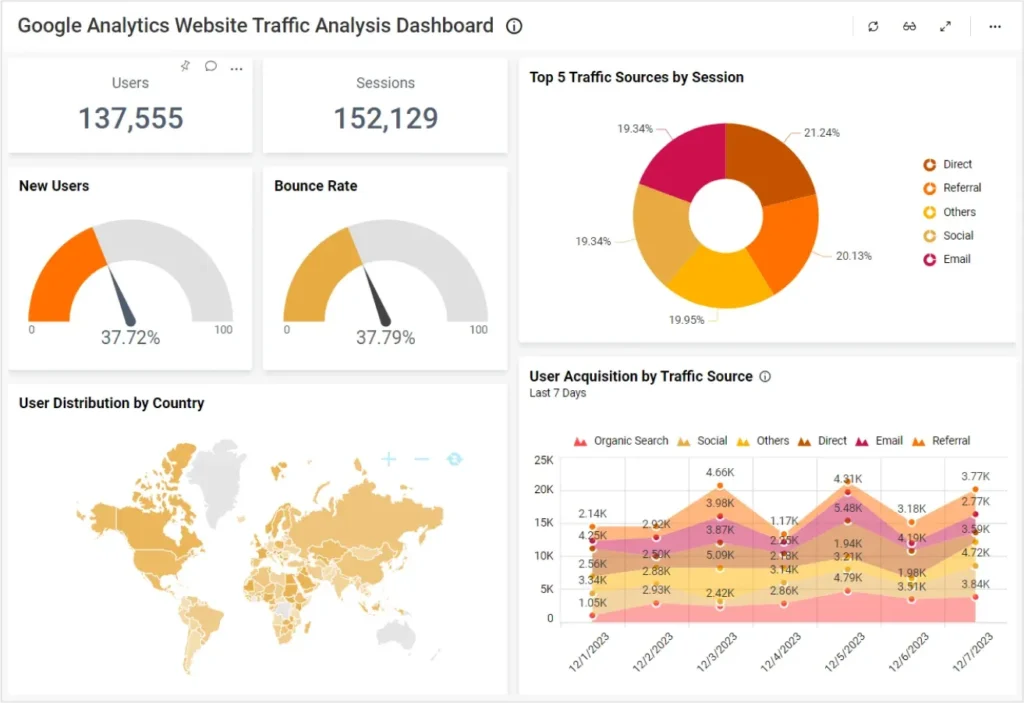
Why it matters: Without measuring results, you can’t know what’s working or where to improve. Data guides your strategy.
Real-life example: A marketing agency discovers through analytics that their “beginner guides” generate 3x more conversions than other content types, so they create more guides and revenue doubles.
10 Analytics & Reporting Prompts:
- Create a list of 10 key performance indicators (KPIs) for a monthly SEO report for a small business.
- Explain the difference between organic sessions and organic traffic in Google Analytics 4.
- I see a drop in organic traffic. Act as an SEO consultant and ask me 5 questions to help diagnose the potential cause.
- Generate a template for a simple, one-page SEO report for a client, highlighting key wins and next steps.
- How do I track rankings for my target keywords over time? Suggest a method or tool.
- What is the difference between impressions and clicks in Google Search Console? What does a high impression/low click-through rate indicate?
- How can I use Google Analytics 4 to see which landing pages are driving the most organic conversions?
- Suggest a way to visualize SEO progress for a non-technical stakeholder (e.g., a boss or client).
- What are bounce rate and average session duration, and why are they important SEO metrics?
- How can I attribute offline sales (e.g., phone calls from a local business) to my SEO efforts?
Category 9: AI-Assisted Content Creation & Editing
A workspace with a laptop, notebook, calculator, and printed graphs illustrating a content writing and blogging environment .

What it means: Using artificial intelligence tools to help draft, refine, and polish your content more efficiently.
Why it matters: AI can speed up content creation by 10x while maintaining quality, allowing you to publish more consistently.
Real-life example: A solo blogger uses AI to transform rough bullet points into a polished 2,000-word article in 30 minutes instead of 4 hours, tripling their content output.
10 AI Content Creation & Editing Prompts:
- Expand the following bullet points into a detailed, paragraph-long section for a blog post: [List your bullet points].
- Improve the readability of the following paragraph for a 10th-grade reading level: [Paste your paragraph].
- Rephrase this sentence to make it more concise and powerful: “[Paste your sentence]”.
- Write a conclusion for a blog post about “[Blog Post Topic]” that summarizes key points and encourages comments.
- Generate 5 different engaging headlines for an article about “[Article Topic]”.
- Check the following text for tone and consistency. Make it sound more [Choose: authoritative, friendly, professional, exciting]: [Paste text].
- Create a summary or TL;DR (Too Long; Didn’t Read) for the following article: [Paste article text].
- Suggest transitions to improve the flow between these two paragraphs: [Paste Paragraph 1] [Paste Paragraph 2].
- Identify passive voice in the following text and suggest active voice alternatives: [Paste text].
- Based on this outline, write a 300-word introduction for a blog post: [Paste your outline].
Category 10: Voice Search & Featured Snippets
What it means: Optimizing your content to appear in voice search results from devices like Alexa and Siri, and in featured snippet boxes at the top of Google results.
Why it matters: Voice searches are growing rapidly, with over 1 billion voice searches happening monthly. Featured snippets get significantly more clicks than regular results.
Real-life example: A recipe website structures their content to answer “How do you make chocolate chip cookies?” in a clear, step-by-step format. Google features this as a snippet, and the page’s traffic increases by 400%.
10 Voice Search & Featured Snippet Prompts:
- Rewrite the following FAQ answer in a concise, direct manner (under 40 words) to increase its chance of being featured as a snippet: [Paste current answer].
- Generate 10 voice search queries someone might use to find a business like “[Your Business Type]” using a smart speaker.
- Structure the following information into a bulleted list, which is ideal for a “list” featured snippet: [Paste information].
- How should I structure a “How-to” article to maximize its chance of winning the “how-to” featured snippet?
- What is the “People Also Ask” (PAA) box, and what strategy can I use to get my content listed there?
- Write a definition for the term “[Industry Term]” in 2-3 sentences, optimized for a “definition” snippet.
- Suggest a schema markup type that can help my content appear in voice search results.
- What are the key differences between traditional keyword search intent and voice search intent?
- Analyze the current featured snippet for the query “[Your Target Query]”. How can I create a better, more concise answer?
- Create a table comparing [Product A] and [Product B] for a “table” featured snippet.
Your Step-by-Step Action Plan: Getting Started Today
Now that you have 100 powerful prompts, here’s how to put them into action:
Week 1: Foundation Building
Day 1-2: Choose 5 keyword research prompts from Category 1 and discover what your audience is searching for.
Day 3-4: Use Category 2 prompts to optimize your existing web pages with better titles and descriptions.
Day 5-7: Generate 10 new content ideas using Category 3 prompts and create a simple content calendar.
Week 2: Content Creation
Day 8-10: Write your first AI-assisted article using prompts from Categories 2 and 9.
Day 11-12: Optimize your article for featured snippets using Category 10 prompts.
Day 13-14: Review and refine your content, ensuring it provides real value to readers.
Week 3: Technical Optimization
Day 15-17: Run through the technical SEO checklist from Category 4.
Day 18-19: If you have a local business, implement Category 6 local SEO strategies.
Day 20-21: For online stores, apply Category 7 e-commerce optimization techniques.
Week 4: Promotion & Measurement
Day 22-24: Start your link building efforts using Category 5 prompts.
Day 25-27: Set up analytics tracking following Category 8 guidance.
Day 28-30: Create your first SEO report and plan next month’s strategy.
Common Beginner Mistakes to Avoid
Visual overview of key on-page and off-page SEO elements with major search engine and social media icons
As you start using ChatGPT for SEO, watch out for these pitfalls:
Mistake #1: Copying AI Content Without Editing
ChatGPT generates great drafts, but always review, fact-check, and add your unique perspective. Search engines reward original, authentic content.
Mistake #2: Ignoring Search Intent
Keywords alone aren’t enough. Make sure your content actually answers what people are looking for when they search.
Mistake #3: Keyword Stuffing
Using your keyword too many times makes content awkward and can hurt your rankings. Aim for natural, conversational writing.
Mistake #4: Expecting Instant Results
SEO takes time—usually 4-6 months to see significant results. Be patient and stay consistent.
Mistake #5: Forgetting Mobile Users
Over 60% of searches happen on mobile devices. Always ensure your website works perfectly on phones.
Measuring Your Success: Key Metrics to Track
Keyword research dashboard showing keyword rankings, trends over time, length distribution, country distribution, and device usage
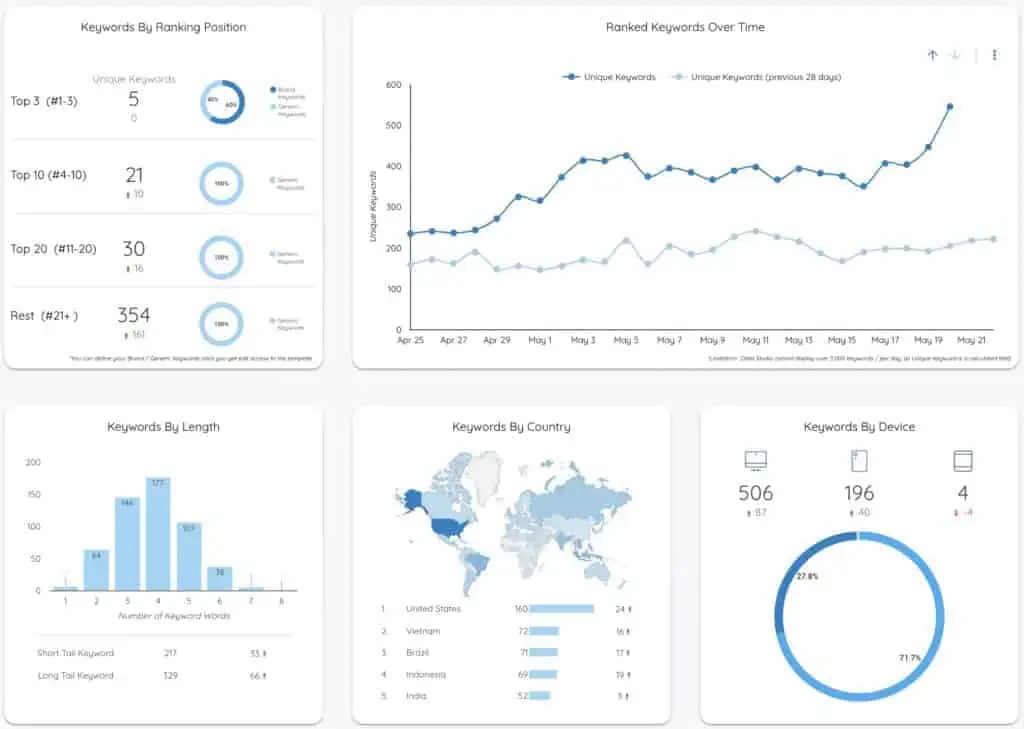
Focus on these essential metrics to gauge your SEO progress:
Organic Traffic: The number of visitors coming from search engines (measured in Google Analytics).
Keyword Rankings: Your position in search results for target keywords.
Click-Through Rate (CTR): The percentage of people who click your result when it appears in search.
Bounce Rate: The percentage of visitors who leave immediately (lower is better).
Conversions: Actions you want visitors to take (purchases, sign-ups, contact forms).
Track these monthly and celebrate improvements, no matter how small!
Beyond the Prompts: Building Long-Term SEO Success
While ChatGPT prompts are incredibly powerful tools, remember that successful SEO requires consistency, patience, and genuine value creation.
Three Golden Rules for SEO Success:
Create for Humans First: Always prioritize your readers’ needs over search engines.
Stay Updated: SEO best practices evolve constantly. Keep learning and adapting.
Build Real Relationships: Whether it’s earning backlinks or gaining reviews, authentic connections matter most.
Ready to Transform Your SEO Strategy?
A student learning digital marketing online, taking notes with a laptop and headphones in a home study setup
You now have 100 proven ChatGPT prompts covering every aspect of SEO—from keyword research to analytics reporting. These aren’t just theoretical ideas; they’re the exact tools professionals use daily to save time and achieve better results.
The difference between where you are now and where you want to be isn’t complicated algorithms or expensive tools. It’s taking action. Start with just one category today. Pick five prompts, test them out, and see the results for yourself.
Your Next Steps with ILMA Academy 360
Key components of digital marketing illustrated in an easy-to-understand infographic
Want to take your digital marketing skills to the next level? ILMA Academy 360 offers comprehensive courses designed specifically for beginners like you. Our expert instructors break down complex topics into easy-to-understand lessons, complete with practical assignments and real-world projects.
Join our thriving community of digital marketers who are learning, growing, and succeeding together. Whether you’re interested in SEO, social media marketing, content creation, or the full digital marketing spectrum, we’ve got courses tailored to your goals.
👉 Visit ILMA Academy 360 today to explore our course offerings and start your digital marketing journey with confidence!
Don’t just read about SEO master it. Your future success starts with the decision you make right now.